


こんにちは、西海です。
先日、MySQLからRDSへのデータ移行の方法について調査したので、その内容をまとめます。
目的
EC2インスタンス内のMySQL5.7に存在するデータを、RDSで構築したMySQL8.4.7に移行する方法をまとめる。
環境準備:
検証用にMySQL5.7がインストールされたEC2を作成し、テストデータ、パラメータを設定します。
今回用意したテストデータとパラメータは以下の通りです。
テストデータ
| 項目 | 数 | 説明 |
|---|---|---|
| データベース | 1個 | test_migration |
| テーブル | 5個 | customers, products, orders, order_details, activity_logs |
| ビュー | 3個 | customer_order_summary, order_details_view, product_stock_status |
| プロシージャ | 4個 | 注文作成、キャンセル、集計、ログ生成 |
| ファンクション | 1個 | 顧客ランク計算 |
| データ総件数 | 1,048件 | 顧客10 + 商品10 + 注文10 + 明細18 + ログ1000 |
| ビューデータ件数 | 39件 | customer_order_summary: 10 + product_stock_status: 10 + order_details_view: 18 |
パラメータ
| 項目 | 値 | 説明 |
|---|---|---|
| character_set_server | utf8mb4 | サーバーのデフォルト文字セット。日本語や絵文字を含む多言語対応 |
| collation_server | utf8mb4_general_ci | 文字列の比較・ソート方法。大文字小文字を区別しない |
| max_connections | 200 | 同時接続可能な最大接続数 |
| innodb_buffer_pool_size | 1G | InnoDBのデータとインデックスをキャッシュするメモリサイズ。 |
| sql_mode | STRICT_TRANS_TABLES,NO_ENGINE_SUBSTITUTION | SQLの厳密性。不正なデータ挿入を防ぎ、ストレージエンジンの自動置換を無効化 |
| max_allowed_packet | 64M | 1つのクエリやレスポンスで送受信できる最大データサイズ |
| innodb_file_per_table | 1 | テーブルごとに個別のファイルを作成(有効)。 |
| performance_schema | ON | パフォーマンス監視機能を有効化。 |
| general_log | 1 | 全てのクエリを記録する一般ログを有効化。 |
| general_log_file | /var/lib/mysql/general.log | 一般ログの出力先ファイルパス |
また、EC2へのSession Manager用のIAMロールを作成しアタッチします。
さらに、以下の設定値の通りにEC2とRDSへアタッチするセキュリティグループも作成します。
※アウトバウンドルールはデフォルトのままとする。
・EC2用セキュリティグループのインバウンドルール
| 項目 | 値 | 説明 |
|---|---|---|
| タイプ | MYSQL/Aurora | |
| ソース | RDSにアタッチするセキュリティグループ |
・RDS用セキュリティグループのインバウンドルール
| 項目 | 値 | 説明 |
|---|---|---|
| タイプ | MYSQL/Aurora | |
| ソース | EC2にアタッチするセキュリティグループ |
環境確認
VPCとサブネット
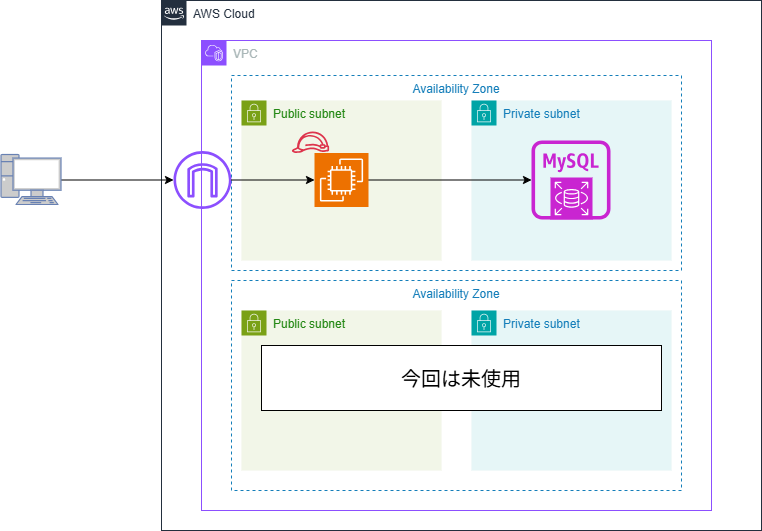
設定されているVPCのリンクからVPCの設定画面へ移動し、移行元のEC2インスタンスに設定されているVPCとAZの情報を確認します。
今回の設定は以下のようになっていました。
| 項目 | 値 |
|---|---|
| VPC ID | vpc-0821e242fa8f03052 / mysql-rds-vpc |
| AZ1 | ap-northeast-1a |
| AZ2 | ap-northeast-1c |
| サブネット1 | subnet-0bf31867a80fd519f / mysql-rds-subnet-public1-ap-northeast-1a |
| サブネット2 | subnet-0cf6bfaa0f86bef8f / mysql-rds-subnet-private1-ap-northeast-1a |
| サブネット3 | subnet-00a889e08e3e71bf9 / mysql-rds-subnet-private2-ap-northeast-1c |
移行前データ内容確認
移行元のデータベースにアクセス後、以下のコマンドから各項目の内容を確認します。
・データベースアクセスコマンド
mysql -u root -p[ログインパスワード]| コマンド | 確認項目 |
|---|---|
| SHOW DATABASES; | データベースの一覧 |
| SELECT VERSION(); | MySQLのバージョン |
| SHOW FULL TABLES; | テーブルの一覧 |
| SELECT TABLE_NAME, TABLE_ROWS FROM information_schema.TABLES WHERE TABLE_SCHEMA = ‘[データベース名]’ AND TABLE_TYPE = ‘BASE TABLE’; | テーブルに登録されているデータ件数 |
| SELECT ” AS view_name, COUNT(*) FROM | ビューテーブルのデータ件数 |
| SELECT * FROM "テーブル名"; | テーブルの内容確認 |
| SHOW PROCEDURE STATUS WHERE Db = ‘[データベース名]’; | プロシージャの一覧 |
| SHOW FUNCTION STATUS WHERE Db = ‘[データベース名]’; | ファンクションの一覧 |
今回確認した結果は以下の通りです。
・データベースの一覧
mysql> SHOW DATABASES;
+--------------------+
| Database           |
+--------------------+
| information_schema |
| mysql              |
| performance_schema |
| sys                |
| test_migration     |
+--------------------+
5 rows in set (0.00 sec)
・MySQLのバージョン
mysql> SELECT VERSION();
+------------+
| VERSION()  |
+------------+
| 5.7.44-log |
+------------+
1 row in set (0.00 sec)
・テーブルの一覧
mysql> SHOW FULL TABLES;
+--------------------------+------------+
| Tables_in_test_migration | Table_type |
+--------------------------+------------+
| activity_logs            | BASE TABLE |
| customer_order_summary   | VIEW       |
| customers                | BASE TABLE |
| order_details            | BASE TABLE |
| order_details_view       | VIEW       |
| orders                   | BASE TABLE |
| product_stock_status     | VIEW       |
| products                 | BASE TABLE |
+--------------------------+------------+
8 rows in set (0.00 sec)
・テーブルに登録されているデータ件数
mysql> SELECT TABLE_NAME, TABLE_ROWS FROM information_schema.TABLES WHERE TABLE_SCHEMA = 'test_migration' AND TABLE_TYPE = 'BASE TABLE';
+---------------+------------+
| TABLE_NAME    | TABLE_ROWS |
+---------------+------------+
| activity_logs |       1000 |
| customers     |         10 |
| order_details |         18 |
| orders        |         10 |
| products      |         10 |
+---------------+------------+
5 rows in set (0.00 sec)
・ビューテーブルのデータ件数
mysql> SELECT 'customer_order_summary' AS view_name, COUNT(*) FROM customer_order_summary UNION ALL SELECT 'product_stock_status', COUNT(*) FROM product_stock_status UNION ALL SELECT 'order_details_view', COUNT(*) FROM order_details_view;
+------------------------+----------+
| view_name              | COUNT(*) |
+------------------------+----------+
| customer_order_summary |       10 |
| product_stock_status   |       10 |
| order_details_view     |       18 |
+------------------------+----------+
3 rows in set (0.00 sec)
・プロシージャの数
mysql -u root -p test_migration -e "
SHOW PROCEDURE STATUS WHERE Db = 'test_migration';"
Enter password:
+----------------+-------------------------+-----------+----------------+---------------------+---------------------+---------------+---------+----------------------+----------------------+--------------------+
| Db             | Name                    | Type      | Definer        | Modified            | Created             | Security_type | Comment | character_set_client | collation_connection | Database Collation |
+----------------+-------------------------+-----------+----------------+---------------------+---------------------+---------------+---------+----------------------+----------------------+--------------------+
| test_migration | calculate_sales_summary | PROCEDURE | root@localhost | 2026-01-19 09:55:27 | 2026-01-19 09:55:27 | DEFINER       |         | utf8                 | utf8_general_ci      | utf8mb4_general_ci |
| test_migration | cancel_order            | PROCEDURE | root@localhost | 2026-01-19 09:55:27 | 2026-01-19 09:55:27 | DEFINER       |         | utf8                 | utf8_general_ci      | utf8mb4_general_ci |
| test_migration | create_order            | PROCEDURE | root@localhost | 2026-01-19 09:55:27 | 2026-01-19 09:55:27 | DEFINER       |         | utf8                 | utf8_general_ci      | utf8mb4_general_ci |
| test_migration | generate_test_logs      | PROCEDURE | root@localhost | 2026-01-19 09:55:27 | 2026-01-19 09:55:27 | DEFINER       |         | utf8                 | utf8_general_ci      | utf8mb4_general_ci |
+----------------+-------------------------+-----------+----------------+---------------------+---------------------+---------------+---------+----------------------+----------------------+--------------------+
・ファンクションの数
mysql -u root -p test_migration -e "
SHOW FUNCTION STATUS WHERE Db = 'test_migration';"
Enter password:
+----------------+-------------------+----------+----------------+---------------------+---------------------+---------------+---------+----------------------+----------------------+--------------------+
| Db             | Name              | Type     | Definer        | Modified            | Created             | Security_type | Comment | character_set_client | collation_connection | Database Collation |
+----------------+-------------------+----------+----------------+---------------------+---------------------+---------------+---------+----------------------+----------------------+--------------------+
| test_migration | get_customer_rank | FUNCTION | root@localhost | 2026-01-19 09:55:27 | 2026-01-19 09:55:27 | DEFINER       |         | utf8                 | utf8_general_ci      | utf8mb4_general_ci |
+----------------+-------------------+----------+----------------+---------------------+---------------------+---------------+---------+----------------------+----------------------+--------------------+
・テーブルの内容確認
ここでは代表してactivity_logs、customers、productsのテーブル内容を確認しています。
実作業時はすべてのテーブル内容を確認する必要があります。
mysql> SELECT * FROM activity_logs;
+--------+---------+-----------+---------------------+---------------------+
| log_id | user_id | action    | description         | log_date            |
+--------+---------+-----------+---------------------+---------------------+
|      1 |      61 | action_3  | Test log entry #0   | 2026-01-19 03:00:19 |
|      2 |      40 | action_3  | Test log entry #1   | 2026-01-19 03:00:19 |
|      3 |       7 | action_6  | Test log entry #2   | 2026-01-19 03:00:19 |
(中略)
|    998 |      70 | action_8  | Test log entry #997 | 2026-01-19 03:00:20 |
|    999 |      75 | action_5  | Test log entry #998 | 2026-01-19 03:00:20 |
|   1000 |     100 | action_7  | Test log entry #999 | 2026-01-19 03:00:20 |
+--------+---------+-----------+---------------------+---------------------+
1000 rows in set (0.00 sec)
mysql> SELECT * FROM customers;
+-------------+-----------------+-----------------------+---------------+---------------------+---------------------+
| customer_id | customer_name | email | phone | created_at | updated_at |
+-------------+-----------------+-----------------------+---------------+---------------------+---------------------+
| 1 | 山田太郎 | yamada@example.com | 090-1234-5678 | 2026-01-19 03:00:19 | 2026-01-19 03:00:19 |
| 2 | 鈴木花子 | suzuki@example.com | 080-2345-6789 | 2026-01-19 03:00:19 | 2026-01-19 03:00:19 |
| 3 | 佐藤次郎 | sato@example.com | 070-3456-7890 | 2026-01-19 03:00:19 | 2026-01-19 03:00:19 |
| 4 | 田中美咲 | tanaka@example.com | 090-4567-8901 | 2026-01-19 03:00:19 | 2026-01-19 03:00:19 |
| 5 | 高橋健一 | takahashi@example.com | 080-5678-9012 | 2026-01-19 03:00:19 | 2026-01-19 03:00:19 |
| 6 | 伊藤愛 | ito@example.com | 070-6789-0123 | 2026-01-19 03:00:19 | 2026-01-19 03:00:19 |
| 7 | 渡辺翔太 | watanabe@example.com | 090-7890-1234 | 2026-01-19 03:00:19 | 2026-01-19 03:00:19 |
| 8 | 中村さくら | nakamura@example.com | 080-8901-2345 | 2026-01-19 03:00:19 | 2026-01-19 03:00:19 |
| 9 | 小林大輔 | kobayashi@example.com | 070-9012-3456 | 2026-01-19 03:00:19 | 2026-01-19 03:00:19 |
| 10 | 加藤結衣 | kato@example.com | 090-0123-4567 | 2026-01-19 03:00:19 | 2026-01-19 03:00:19 |
+-------------+-----------------+-----------------------+---------------+---------------------+---------------------+
10 rows in set (0.00 sec)mysql> SELECT * FROM products;
+------------+---------------------------------+----------+-------+--------------------+---------------------+
| product_id | product_name | price | stock | category | created_at |
+------------+---------------------------------+----------+-------+--------------------+---------------------+
| 1 | ノートパソコン | 89800.00 | 25 | 電子機器 | 2026-01-19 03:00:19 |
| 2 | ワイヤレスマウス | 2980.00 | 149 | 周辺機器 | 2026-01-19 03:00:19 |
| 3 | USB-Cケーブル | 1280.00 | 200 | 周辺機器 | 2026-01-19 03:00:19 |
| 4 | モニター 27インチ | 32800.00 | 30 | 電子機器 | 2026-01-19 03:00:19 |
| 5 | キーボード メカニカル | 15800.00 | 45 | 周辺機器 | 2026-01-19 03:00:19 |
| 6 | Webカメラ | 8900.00 | 60 | 周辺機器 | 2026-01-19 03:00:19 |
| 7 | 外付けSSD 1TB | 12800.00 | 80 | ストレージ | 2026-01-19 03:00:19 |
| 8 | マウスパッド | 980.00 | 300 | アクセサリー | 2026-01-19 03:00:19 |
| 9 | ノートPC スタンド | 3480.00 | 100 | アクセサリー | 2026-01-19 03:00:19 |
| 10 | HDMIケーブル 2m | 1580.00 | 250 | 周辺機器 | 2026-01-19 03:00:19 |
+------------+---------------------------------+----------+-------+--------------------+---------------------+
10 rows in set (0.00 sec)パラメータとオプション
以下のコマンドでMySQLのコンフィグファイルを確認し、デフォルトから変更されているパラメータとオプションを確認します。
grep -Ev "^#|^$|^\[|^;" /etc/my.cnf今回は以下の設定となっていました。
下記結果から、hacharacter_set_server以降のパラメータについてはパラメータグループでの設定が必要になります。
また、オプションは特に設定されていません。
※datadir~general_log_fileまでは移行後はRDS管理の項目となるためパラメータとしての設定は不要。
[root@ip-10-0-1-217 ~]# grep -Ev "^#|^$|^\[|^;" /etc/my.cnf
datadir=/var/lib/mysql
socket=/var/lib/mysql/mysql.sock
symbolic-links=0
log-error=/var/log/mysqld.log
pid-file=/var/run/mysqld/mysqld.pid
general_log_file = /var/lib/mysql/general.log
general_log = 1
character_set_server = utf8mb4
collation_server = utf8mb4_general_ci
max_connections = 200
innodb_buffer_pool_size = 1G
sql_mode = STRICT_TRANS_TABLES,NO_ENGINE_SUBSTITUTION
max_allowed_packet = 64M
innodb_file_per_table = 1
performance_schema = ON
[root@ip-10-0-1-217 ~]# RDS関連作成
先ほど確認した結果をもとに、移行先のRDSを作成します。
今回、MySQLの最新バージョンであるMySQL8.4.7を使用することとします。
RDSパラメータグループ作成
「パラメータグループの作成」ボタンを押下し、以下の設定値に従ってリソースを作成します。
| 設定箇所 | 設定値 | 説明 |
|---|---|---|
| パラメータグループ名 | 任意の値 | 今回はmysql84-custom-params |
| 説明 | 任意の値 | 今回はCustom parameter group for MySQL 8.4 migration from MySQL 5.7 |
| エンジンのタイプ | MySQL Community | |
| パラメータグループファミリー | mysql8.4 | |
| タイプ | DB Parameter Group |
作成後、パラメータグループを選択し内容の編集を行います。
修正が必要な項目は先ほど環境確認で確認したものとなるので、それに合わせて各項目の値を修正します。
全ての項目の修正が完了後、「変更を保存」ボタンを押下し設定を保存します。
RDSオプショングループ作成
「オプショングループの作成」ボタンを押下し、以下の設定値に従ってリソースを作成します。
ただし、今回はオプション機能の設定は確認できなかったため、作成後の設定値追加は不要です。
| 設定箇所 | 設定値 | 説明 |
|---|---|---|
| 名前 | 任意の値 | 今回はmysql84-options |
| 説明 | 任意の値 | 今回はCustom option group for MySQL 8.4 migration (default settings) |
| エンジン | mysql | |
| メジャーエンジンバージョン | 8.4 |
DB サブネットグループを作成作成
「DB サブネットグループを作成」ボタンを押下し、以下の設定値に従ってリソースを作成します。
| 設定箇所 | 設定値 | 説明 |
|---|---|---|
| 名前 | 任意の値 | 今回はmysql-subnet-group |
| 説明 | 任意の値 | 今回はSubnet group for MySQL RDS instance |
| VPC | RDSインスタンスを配置するVPC | |
| アベイラビリティーゾーン | 選択できるAZから2つ選択 | |
| サブネット | プライベートサブネットを指定 |
RDSインスタンス作成
「データベースの作成」ボタンを押下し、以下の設定値に従ってリソースを作成します。
| 設定箇所 | 設定値 | 説明 |
|---|---|---|
| データベース作成方法を選択 | フル設定 | |
| エンジンのタイプ | MySQL | |
| エディション | MySQL Community | |
| マルチ AZ DB クラスターをサポートするバージョンのみを表示 | 無効 | |
| Amazon RDS Optimized Writes をサポートするバージョンのみを表示 | 無効 | |
| エンジンバージョン | MySQL8.4.7 | 2026年1月現在の最新バージョン |
| RDS 延長サポートの有効化 | 無効 | |
| テンプレート | 無料利用枠 | |
| 可用性と耐久性 | シングル AZ DB インスタンスデプロイ (1 インスタンス) | 無料枠では他は選択不可 |
| DB インスタンス識別子 | 移行元データベース名 | 何のデータを格納するか確認しやすくするため |
| マスターユーザー名 | admin | デフォルト値であり、移行後のDEFINER値と一致させるため |
| 認証情報管理 | セルフマネージド | 料金の発生を抑えるため |
| パスワードを自動生成 | 無効 | 自動生成したい場合は有効にする |
| マスターパスワード | 任意の値 | 新環境として新規の値を設定する |
| マスターパスワードを確認 | マスターパスワードで設定した値 | |
| データベース認証オプション | パスワード認証 | Additional credentials settings 内に存在 |
| Amazon RDS Optimized Writes をサポートするインスタンスクラスを表示 | 無効 | |
| 以前の世代のクラスを含める | 無効 | |
| DB インスタンスクラス | db.t4g.micro | 無料枠で使用できる中で一番性能が高いため |
| ストレージタイプ | 汎用SSD(gp2) | |
| ストレージ割り当て | 20 | |
| ストレージの自動スケーリングを有効にする | 無効 | 追加のストレージ設定 内に存在 |
| コンピューティングリソース | EC2 コンピューティングリソースに接続しない | 常時接続は不要 |
| Virtual Private Cloud (VPC) | RDSインスタンスを配置するVPC | |
| DB サブネットグループ | 作成したDBサブネットグループを選択 | |
| パブリックアクセス | なし | |
| VPC セキュリティグループ (ファイアウォール) | 既存の選択 | |
| 新しい VPC セキュリティグループ名 | 事前準備で作成したRDS用セキュリティグループ | |
| アベイラビリティーゾーン | 選択可能な中から1つを選択 | |
| RDS Proxy を作成 | 無効 | |
| 認証機関 | rds-ca-rsa2048-g1 | |
| データベースポート | 3306 | |
| タグ | 任意の値 | |
| モニタリング | 全てデフォルトのまま | |
| 追加設定 | 以下の項目以外はデフォルトのまま | |
| 最初のデータベース名 | 移行元データベース名 | 移行元のデータベースと合わせるため。今回はtest_migration |
| DB パラメータグループ | 作成したパラメータグループを選択 | |
| オプショングループ | 作成したオプショングループを選択 | |
| 自動バックアップを有効にする | 無効 | |
| マイナーバージョン自動アップグレードの有効化 | 無効 |
移行元(EC2)での移行用データ作成
移行元のEC2上でmysqldumpコマンドを使用して移行用データファイルを作成します。
以下のコマンドを実行するとrootユーザーのパスワードを聞かれるため入力した後、エラーの表示なくプロンプトが表示されれば正常に作成完了。
mysqldump --user=root --password \
--single-transaction \
--routines \
--triggers \
--events \
--set-gtid-purged=OFF \
--databases <移行するデータベース名> > /tmp/<移行用データファイル名>.sqlそれぞれのオプションの意味は以下の通りです。
| オプション | 説明 |
|---|---|
| –single-transaction | トランザクション開始時点のデータをダンプする |
| –routines | プロシージャ・ファンクションをエクスポートする |
| –triggers | トリガーをエクスポートする |
| –events | イベントスケジューラをエクスポートする |
| –set-gtid-purged | GTID情報を含めない |
| –default-character-set | 文字セット指定する |
| –databases | 移行するデータベースを指定する |
実行結果
[root@ip-10-0-1-217 ~]# mysqldump -u root -p \
--single-transaction \
--routines \
--triggers \
--events \
--set-gtid-purged=OFF \
--default-character-set=utf8mb4 \
--databases test_migration \
> /tmp/test_migration_fresh.sql
Enter password:
[root@ip-10-0-1-217 ~]#以下のコマンドでファイルが存在することも確認します。
[root@ip-10-0-1-217 ~]# ls -al /tmp/test_migration_fresh.sql
-rw-r--r--. 1 root root 85514 Jan 19 04:48 /tmp/test_migration_fresh.sql
[root@ip-10-0-1-217 ~]#RDSではSUPER権限が付与されないため、以下コマンドで作成したファイルからDEFINER句を削除し、インポート実行ユーザー(admin)がDEFINERとして設定されるように修正します。
sed 's/DEFINER[ ]*=[ ]*`[^`]*`@`[^`]*`[ ]*/ /g' /tmp/<移行用データファイル名>.sql > /tmp/<修正後の移行用データファイル名>.sql && \
echo "DEFINER remaining: $(grep -c 'DEFINER=' /tmp/test_migration_no_definer.sql || echo 0)"— DEFINER remainingの値が0と表示されれば処理は正常に完了です。
[root@ip-10-0-1-217 ~]# sed 's/DEFINER[ ]*=[ ]*`[^`]*`@`[^`]*`[ ]*/ /g' /tmp/test_migration_fresh.sql > /tmp/test_migration_no_definer.sql && \
echo "DEFINER remaining: $(grep -c 'DEFINER=' /tmp/test_migration_no_definer.sql || echo 0)"
DEFINER remaining: 0
0
[root@ip-10-0-1-217 ~]#再度lsコマンドでファイルが存在していることを確認します。
[root@ip-10-0-1-217 ~]# ls -al /tmp/test_migration_no_definer.sql
-rw-r--r--. 1 root root 85306 Jan 19 07:42 /tmp/test_migration_no_definer.sql
[root@ip-10-0-1-217 ~]#移行実施
作成したRDSにて以下の情報を確認します。
・エンドポイント名
・ポート
・マスターユーザー名
確認後以下のコマンドでRDSへアクセスできることを確認します。
mysql -h [RDSエンドポイント] -P [ポート] -u [マスターユーザー名] -p
以下のようにmysqlのプロンプトが表示されれば接続は成功です。
[root@ip-10-0-1-217 ~]# mysql -h mysql8-4-7.chq84wagcnn2.ap-northeast-1.rds.amazonaws.com -P 3306 -u admin -p
Enter password:
Welcome to the MySQL monitor. Commands end with ; or \g.
Your MySQL connection id is 17
Server version: 8.4.7 Source distribution
Copyright (c) 2000, 2023, Oracle and/or its affiliates.
Oracle is a registered trademark of Oracle Corporation and/or its
affiliates. Other names may be trademarks of their respective
owners.
Type 'help;' or '\h' for help. Type '\c' to clear the current input statement.
mysql> EXIT;
Bye
[root@ip-10-0-1-217 ~]#mysqlプロンプトから抜けた後、以下コマンドで先ほど作成した移行用データファイルをRDSへインポートします。
mysql -h [RDSエンドポイント] -P 3306 -u admin -p < /tmp/<移行用データファイル名>.sqlエラー表示なくプロンプトが表示されれば正常に完了です。
[root@ip-10-0-1-217 ~]# mysql -h mysql8-4-7.chq84wagcnn2.ap-northeast-1.rds.amazonaws.com -P 3306 -u admin -p < /tmp/test_migration_no_definer.sql
Enter password:
[root@ip-10-0-1-217 ~]#検証
•接続確認
以下のコマンドにて移行後のデータベースへ接続できることを確認します。
mysql -h [RDSのエンドポイント値] -u [マスターユーザー名] -p [移行したデータベース名]mysqlのプロンプトが表示された後、以下のコマンドで移行したデータベース名が表示されることを確認します。
SELECT DATABASE();実行結果
[root@ip-10-0-1-217 ~]# mysql -h mysql8-4-7.chq84wagcnn2.ap-northeast-1.rds.amazonaws.com \
-u admin -p test_migration
Enter password:
Reading table information for completion of table and column names
You can turn off this feature to get a quicker startup with -A
Welcome to the MySQL monitor. Commands end with ; or \g.
Your MySQL connection id is 211
Server version: 8.4.7 Source distribution
Copyright (c) 2000, 2023, Oracle and/or its affiliates.
Oracle is a registered trademark of Oracle Corporation and/or its
affiliates. Other names may be trademarks of their respective
owners.
Type 'help;' or '\h' for help. Type '\c' to clear the current input statement.
mysql> SELECT DATABASE();
+----------------+
| DATABASE() |
+----------------+
| test_migration |
+----------------+
1 row in set (0.00 sec)
mysql>•元と先の比較
移行前に確認した項目を移行後のDBでも確認し結果を確認します。
mysql> SHOW DATABASES;
+--------------------+
| Database |
+--------------------+
| information_schema |
| mysql |
| performance_schema |
| sys |
| test_migration |
+--------------------+
5 rows in set (0.02 sec)・MySQLのバージョン
mysql> SELECT VERSION();
+-----------+
| VERSION() |
+-----------+
| 8.4.7 |
+-----------+
1 row in set (0.01 sec)・テーブルの一覧
mysql> SHOW FULL TABLES;
+--------------------------+------------+
| Tables_in_test_migration | Table_type |
+--------------------------+------------+
| activity_logs | BASE TABLE |
| customer_order_summary | VIEW |
| customers | BASE TABLE |
| order_details | BASE TABLE |
| order_details_view | VIEW |
| orders | BASE TABLE |
| product_stock_status | VIEW |
| products | BASE TABLE |
+--------------------------+------------+
8 rows in set (0.00 sec)・テーブルに登録されているデータ件数
mysql> SELECT TABLE_NAME, TABLE_ROWS FROM information_schema.TABLES WHERE TABLE_SCHEMA = 'test_migration' AND TABLE_TYPE = 'BASE TABLE';
+---------------+------------+
| TABLE_NAME | TABLE_ROWS |
+---------------+------------+
| activity_logs | 1000 |
| customers | 10 |
| order_details | 18 |
| orders | 10 |
| products | 10 |
+---------------+------------+
5 rows in set (0.00 sec)・ビューテーブルのデータ件数
mysql> SELECT 'customer_order_summary' AS view_name, COUNT(*) FROM customer_order_summary UNION ALL SELECT 'product_stock_status', COUNT(*) FROM product_stock_status UNION ALL SELECT 'order_details_view', COUNT(*) FROM order_details_view;
+------------------------+----------+
| view_name | COUNT(*) |
+------------------------+----------+
| customer_order_summary | 10 |
| product_stock_status | 10 |
| order_details_view | 18 |
+------------------------+----------+
3 rows in set (0.01 sec)・プロシージャの数
Definerがroot@localhostからadmin@%に変更されているのは想定通りのため問題なし。
mysql -h mysql8-4-7.chq84wagcnn2.ap-northeast-1.rds.amazonaws.com \
-u admin -p test_migration -e "
SHOW PROCEDURE STATUS WHERE Db = 'test_migration';"
Enter password:
+----------------+-------------------------+-----------+----------+---------+---------------------+---------------------+---------------+---------+----------------------+----------------------+--------------------+
| Db | Name | Type | Language | Definer | Modified | Created | Security_type | Comment | character_set_client | collation_connection | Database Collation |
+----------------+-------------------------+-----------+----------+---------+---------------------+---------------------+---------------+---------+----------------------+----------------------+--------------------+
| test_migration | calculate_sales_summary | PROCEDURE | SQL | admin@% | 2026-01-19 10:19:35 | 2026-01-19 10:19:35 | DEFINER | | utf8mb3 | utf8mb3_general_ci | utf8mb4_0900_ai_ci |
| test_migration | cancel_order | PROCEDURE | SQL | admin@% | 2026-01-19 10:19:35 | 2026-01-19 10:19:35 | DEFINER | | utf8mb3 | utf8mb3_general_ci | utf8mb4_0900_ai_ci |
| test_migration | create_order | PROCEDURE | SQL | admin@% | 2026-01-19 10:19:35 | 2026-01-19 10:19:35 | DEFINER | | utf8mb3 | utf8mb3_general_ci | utf8mb4_0900_ai_ci |
| test_migration | generate_test_logs | PROCEDURE | SQL | admin@% | 2026-01-19 10:19:35 | 2026-01-19 10:19:35 | DEFINER | | utf8mb3 | utf8mb3_general_ci | utf8mb4_0900_ai_ci |
+----------------+-------------------------+-----------+----------+---------+---------------------+---------------------+---------------+---------+----------------------+----------------------+--------------------+・ファンクションの数
Definerがroot@localhostからadmin@%に変更されているのは想定通りのため問題なし。
mysql -h mysql8-4-7.chq84wagcnn2.ap-northeast-1.rds.amazonaws.com \
-u admin -p test_migration -e "
SHOW FUNCTION STATUS WHERE Db = 'test_migration';"
Enter password:
+----------------+-------------------+----------+----------+---------+---------------------+---------------------+---------------+---------+----------------------+----------------------+--------------------+
| Db | Name | Type | Language | Definer | Modified | Created | Security_type | Comment | character_set_client | collation_connection | Database Collation |
+----------------+-------------------+----------+----------+---------+---------------------+---------------------+---------------+---------+----------------------+----------------------+--------------------+
| test_migration | get_customer_rank | FUNCTION | SQL | admin@% | 2026-01-19 10:19:35 | 2026-01-19 10:19:35 | DEFINER | | utf8mb3 | utf8mb3_general_ci | utf8mb4_0900_ai_ci |
+----------------+-------------------+----------+----------+---------+---------------------+---------------------+---------------+---------+----------------------+----------------------+--------------------+・テーブルの内容確認
移行前と同様activity_logs、customers、productsのテーブル内容を確認します。
※実作業時はすべてのテーブル内容を確認が必要。
mysql> SELECT * FROM activity_logs;
+--------+---------+-----------+---------------------+---------------------+
| log_id | user_id | action | description | log_date |
+--------+---------+-----------+---------------------+---------------------+
| 1 | 61 | action_3 | Test log entry #0 | 2026-01-19 03:00:19 |
| 2 | 40 | action_3 | Test log entry #1 | 2026-01-19 03:00:19 |
| 3 | 7 | action_6 | Test log entry #2 | 2026-01-19 03:00:19 |
(中略)
| 998 | 70 | action_8 | Test log entry #997 | 2026-01-19 03:00:20 |
| 999 | 75 | action_5 | Test log entry #998 | 2026-01-19 03:00:20 |
| 1000 | 100 | action_7 | Test log entry #999 | 2026-01-19 03:00:20 |
+--------+---------+-----------+---------------------+---------------------+
1000 rows in set (0.00 sec)
mysql> SELECT * FROM customers;
+-------------+-----------------+-----------------------+---------------+---------------------+---------------------+
| customer_id | customer_name   | email                 | phone         | created_at          | updated_at          |
+-------------+-----------------+-----------------------+---------------+---------------------+---------------------+
|           1 | 山田太郎        | yamada@example.com    | 090-1234-5678 | 2026-01-19 03:00:19 | 2026-01-19 03:00:19 |
|           2 | 鈴木花子        | suzuki@example.com    | 080-2345-6789 | 2026-01-19 03:00:19 | 2026-01-19 03:00:19 |
|           3 | 佐藤次郎        | sato@example.com      | 070-3456-7890 | 2026-01-19 03:00:19 | 2026-01-19 03:00:19 |
|           4 | 田中美咲        | tanaka@example.com    | 090-4567-8901 | 2026-01-19 03:00:19 | 2026-01-19 03:00:19 |
|           5 | 高橋健一        | takahashi@example.com | 080-5678-9012 | 2026-01-19 03:00:19 | 2026-01-19 03:00:19 |
|           6 | 伊藤愛          | ito@example.com       | 070-6789-0123 | 2026-01-19 03:00:19 | 2026-01-19 03:00:19 |
|           7 | 渡辺翔太        | watanabe@example.com  | 090-7890-1234 | 2026-01-19 03:00:19 | 2026-01-19 03:00:19 |
|           8 | 中村さくら      | nakamura@example.com  | 080-8901-2345 | 2026-01-19 03:00:19 | 2026-01-19 03:00:19 |
|           9 | 小林大輔        | kobayashi@example.com | 070-9012-3456 | 2026-01-19 03:00:19 | 2026-01-19 03:00:19 |
|          10 | 加藤結衣        | kato@example.com      | 090-0123-4567 | 2026-01-19 03:00:19 | 2026-01-19 03:00:19 |
+-------------+-----------------+-----------------------+---------------+---------------------+---------------------+
10 rows in set (0.00 sec)
mysql> SELECT * FROM products;
+------------+---------------------------------+----------+-------+--------------------+---------------------+
| product_id | product_name | price | stock | category | created_at |
+------------+---------------------------------+----------+-------+--------------------+---------------------+
| 1 | ノートパソコン | 89800.00 | 25 | 電子機器 | 2026-01-19 03:00:19 |
| 2 | ワイヤレスマウス | 2980.00 | 149 | 周辺機器 | 2026-01-19 03:00:19 |
| 3 | USB-Cケーブル | 1280.00 | 200 | 周辺機器 | 2026-01-19 03:00:19 |
| 4 | モニター 27インチ | 32800.00 | 30 | 電子機器 | 2026-01-19 03:00:19 |
| 5 | キーボード メカニカル | 15800.00 | 45 | 周辺機器 | 2026-01-19 03:00:19 |
| 6 | Webカメラ | 8900.00 | 60 | 周辺機器 | 2026-01-19 03:00:19 |
| 7 | 外付けSSD 1TB | 12800.00 | 80 | ストレージ | 2026-01-19 03:00:19 |
| 8 | マウスパッド | 980.00 | 300 | アクセサリー | 2026-01-19 03:00:19 |
| 9 | ノートPC スタンド | 3480.00 | 100 | アクセサリー | 2026-01-19 03:00:19 |
| 10 | HDMIケーブル 2m | 1580.00 | 250 | 周辺機器 | 2026-01-19 03:00:19 |
+------------+---------------------------------+----------+-------+--------------------+---------------------+
10 rows in set (0.01 sec)移行前後でデータ内容に差異がないため、移行は正常に完了しました。
まとめ
今回の作業を通して、RDSの構築方法や必要な設定、MySQLのコマンドについて勉強できました。
テストデータはClaudeに作成してもらったのですが、DEFINER句の削除がうまくいかずにかなり時間が溶けました。
MySQLデータの移行方法も、今回使用したmysqldumpコマンド以外の方法があるようなのでそちらも勉強したいです。
参考
他の方が作成した記事もあるので、ぜひご一読ください!
【AWS】WordPress データベース移行(MariaDB→RDS for MySQL)